What is Content based routing?
Content-based routing is used to examine messages and route them to the correct channel or destination depending on a message’s content. We use content-based routing when we want to route messages to its right destination.
Choice flow Control
In mule Choice flow control is used to achieve the content-based routing where routing will be done based on the message content like inbound properties , flow variables and payload .Choice Router will always choose only one route. If no route matches, then the default route is used. In Choice Router we use the MEL expression to specify path for the message.
choice flow control adds the conditional programming to a flow, it is similar to an if/else if /else code block in java.
Use case:
Let’s take an application use case here. When we are expecting a message or payload to be received from the many inbound sources like file channel , FTP channel and a messaging queue and after receiving based on the type of the source we want to process the message accordingly than in this case we can appl choice flow control in the mule flow.
Let’s walk through how to use choice flow control in application.
Search for Composite Source componsnt in Mule Palette and drag and drop it to the source region of the flow.Now we can drag and drop multiple connectors under the composite source (i.e. wrap multiple connectors with the composite source). Here, we will use one HTTP Listener and one File Connector as inbound endpoints and one JMS (ActiveMQ) endpoint to receive messages from different sources. Now grab the choice flow control Mule Palette and drag and drop it after the composite source component.Choice flow control dynamically routes messages based on message payload or properties. use the attribute “expression” of choice flow control to filter the values based on the content of the message.
Flow:
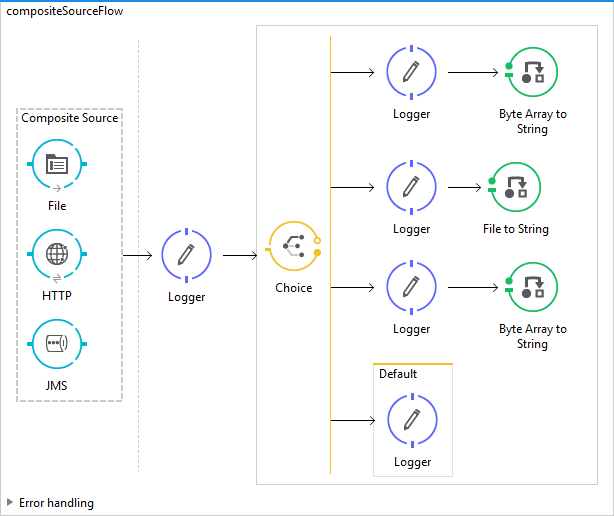
Code:
<mule xmlns:jms=”http://www.mulesoft.org/schema/mule/jms”
xmlns:file=”http://www.mulesoft.org/schema/mule/file” xmlns:http=”http://www.mulesoft.org/schema/mule/http”
xmlns=”http://www.mulesoft.org/schema/mule/core” xmlns:doc=”http://www.mulesoft.org/schema/mule/documentation”
xmlns:spring=”http://www.springframework.org/schema/beans” xmlns:xsi=”http://www.w3.org/2001/XMLSchema-instance”
xsi:schemaLocation=”http://www.mulesoft.org/schema/mule/jms http://www.mulesoft.org/schema/mule/jms/current/mule-jms.xsd
http://www.mulesoft.org/schema/mule/file http://www.mulesoft.org/schema/mule/file/current/mule-file.xsd
http://www.springframework.org/schema/beans http://www.springframework.org/schema/beans/spring-beans-current.xsd
http://www.mulesoft.org/schema/mule/core http://www.mulesoft.org/schema/mule/core/current/mule.xsd
http://www.mulesoft.org/schema/mule/http http://www.mulesoft.org/schema/mule/http/current/mule-http.xsd”>
<file:connector name=”File” autoDelete=”true” doc:name=”File” />
<http:listener-config name=”HTTP_Listener_Configuration” host=”localhost” port=”8081″ basePath=”/composite” doc:name=”HTTP Listener Configuration” />
<jms:activemq-connector name=”Active_MQ” brokerURL=”tcp://localhost:61616″ validateConnections=”true” doc:name=”Active MQ”>
<receiver-threading-profile maxThreadsActive=”200″ maxBufferSize=”100″ />
</jms:activemq-connector>
<flow name=”compositeSourceFlow”>
<composite-source doc:name=”Composite Source”>
<file:inbound-endpoint connector-ref=”File” path=”/file/in/processing/” moveToDirectory=”/file/data/processed” doc:name=”File”>
<file:filename-wildcard-filter pattern=”*.xml” caseSensitive=”false” />
</file:inbound-endpoint>
<http:listener config-ref=”HTTP_Listener_Configuration” path=”/composite” doc:name=”HTTP”> </http:listener>
<jms:inbound-endpoint queue=”myqueue1″ connector-ref=”Active_MQ” doc:name=”JMS”>
<jms:selector expression=”JMSPriority = 4″ />
</jms:inbound-endpoint>
</composite-source>
<logger level=”INFO” message=”#[message]” doc:name=”Logger”></logger>
<choice doc:name=”Choice”>
<when expression=”#[message.inboundProperties[‘http.query.params’]]”>
<logger level=”INFO” message=”Message is triggered from the Http Source”
doc:name=”Logger”></logger>
<byte-array-to-string-transformer
doc:name=”Byte Array to String” />
</when>
<when expression=”#[message.inboundProperties[‘originalDirectory’]]”>
<logger level=”INFO” message=”Message is triggered from the File Channel” doc:name=”Logger”></logger>
<file:file-to-string-transformer doc:name=”File to String” />
</when>
<when expression=”#[message.inboundProperties[‘JMSPriority’]]”>
<logger level=”INFO” message=”Message is triggered from the JMS call” doc:name=”Logger”></logger>
<byte-array-to-string-transformer doc:name=”Byte Array to String” />
</when>
<otherwise>
<logger level=”INFO” message=”Message is triggered from the Unknown Source” doc:name=”Logger”></logger>
</otherwise>
</choice>
</flow>
</mule>
Hope this helps.
Thanks
Keep Learning.